Managing Nostr Keys and Signing Devices
A Guide to Staying Secure and In Control of your Nostr Keys

The decentralized social networking protocol Nostr has gained traction for its promise of censorship resistance and user empowerment.
At its core, Nostr relies on cryptographic keys to ensure identity, security, and control over your online presence.
Thanks for reading ON NOSTR ! Subscribe for free to receive new posts and support my work.
However, with great power comes great responsibility—managing your Nostr keys and signing devices effectively is critical to maintaining your privacy and avoiding potential pitfalls.
In this post, we’ll explore what Nostr keys are, how signing devices fit into the picture, and best practices for keeping everything secure.
What Are Nostr Keys?
Nostr operates on a simple yet powerful concept: your identity is tied to a pair of cryptographic keys—a public key and a private key.
NPUB1234abc7efxtdgxyssert6lrgycc7ef... - (Nostr Username)
NSEC1987zyxpe3nezszqjdrfzszpe3nezsz... - (Nostr Password)
- Public Key (npub): This is your Nostr identity, a unique string starting with npub that you share with others. Think of it as your username or address on the network. Anyone can use it to find you, send you messages, or view your posts.
- Private Key (nsec): This is the secret half of the pair, starting with nsec. It’s what proves you are the owner of your public key and allows you to sign messages, post content, or authenticate actions. If someone gets hold of your private key, they can impersonate you—full stop.
Unlike traditional platforms where a company holds your account, Nostr puts you in charge.
Your keys are your account. Lose them, and you lose access.
Share them carelessly, and you risk being compromised.
Best Practices for Managing Nostr Keys and Signing Devices
Here’s how to keep your Nostr experience secure and stress-free:
Backup Your Private Key Immediately
When you generate a new key pair in a Nostr client, write down your nsec (private key) and store it offline—think paper in a safe, a USB drive in a secure location, or even an encrypted file with a strong passphrase.
Never store your private key in plain text on a cloud service like Google Drive or in an email. If it’s digital, encrypt it first.
Use Multiple Signing Devices
Don’t rely on just one app or device. Export your private key (if the client allows it) and set up multiple trusted devices—like your phone and a desktop client—so you’re not locked out if one fails.
Some clients support importing keys, while others may require you to log in with your nsec each time. Test this process to ensure you’re comfortable moving between devices.
Consider a Dedicated Signing Tool
For extra security, look into tools like Nostr Signer or hardware wallets that support Nostr. These separate your private key from your main client, reducing the risk of exposure if your phone or computer is compromised.
Example: Use a signer app that approves events without ever sharing your nsec with the client itself.
Rotate Keys if Compromised
If you suspect your private key has been exposed (e.g., you logged in on a sketchy device or shared it by mistake), generate a new key pair immediately. Announce your new npub to your followers from your old account (if you still have access) and migrate over.
There’s no central authority to “recover” a compromised account—proactive key rotation is your defense.
Test Your Setup
Before you get too active on Nostr, test your backups and signing devices. Can you log in from a fresh device using your nsec? Does your backup work? Don’t wait for a crisis to find out.
Keep Software Updated
Whether it’s a Nostr client or a signing tool, ensure you’re running the latest version. Bugs in key handling or signing logic can expose vulnerabilities, and developers are quick to patch them.
Beware of Phishing
Nostr’s decentralized nature means scammers can’t be banned easily. Never enter your nsec into a random website or app promising “free zaps” or other perks. Stick to trusted, open-source clients vetted by the community.
Signing Devices: The Key to Convenience
To interact with Nostr, whether posting, following others, or sending encrypted DM, you need a way to use your private key securely.
This is where signing devices come in. Still very new and indevelopment as of March 2025.
A signing device can be software (like a Nostr client) or hardware (like a dedicated key manager) that handles the cryptographic signing process for you.
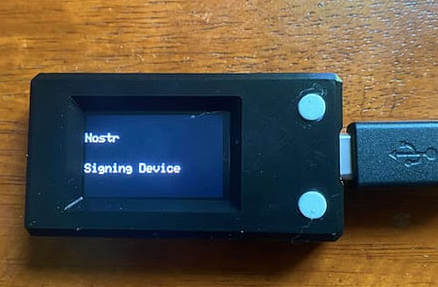
Most Nostr users start with a client like Damus, Primal, or Nostur, which generates and stores their key pair.
These apps act as signing devices by using your private key to sign events (posts, likes, etc.) before broadcasting them to relays.
More advanced users might opt for a hardware signing device or a separate key management tool for added security.
The challenge is balancing convenience with control. Relying on a single app or device can be risky if it’s lost, hacked, or compromised. That’s why understanding how to manage your keys and devices is so important.
Hardware Wallets That Are Compatible With Nostr
Nostr Key management software
There are some new solutions in development to help securely store and manage Nostr private keys (nsec) while allowing remote signing.
NsecBunker: A Fortress for Key Management
NsecBunker is an open-source tool designed to securely store and manage Nostr private keys (nsec) while allowing remote signing and granular control over permissions. Think of it as a self-hosted vault that keeps your private key safe and lets you delegate access without exposing it.
I recommend using start.njump.me which is provided my Fiatjaf, the creator of Nostr to generate your keys and sets this up as part of the onboarding process.
How It Works:
- Key Storage: You import your nsec into nsecBunker, where it’s encrypted with a passphrase (similar to how Lightning Network’s LND secures keys). The key never leaves the bunker unless you explicitly extract it.
- Remote Signing: NsecBunker acts as a daemon that signs Nostr events (posts, DMs, etc.) on your behalf. Clients connect to it via encrypted Nostr events (NIP-46), requesting signatures without ever seeing the nsec.
- Permission Management: It supports creating temporary tokens or "target keys" that grant limited signing rights to specific users or apps. These can be revoked anytime, making it ideal for shared accounts or multi-device setups.
- Self-Hosting: You can run nsecBunker on your own hardware (e.g., a Raspberry Pi in your basement) or a trusted server, keeping control in your hands.
Imagine you’re a business or community managing a Nostr account. With nsecBunker, you can give team members signing access without sharing the master nsec. If someone leaves or a token is compromised, you revoke it—no need to rotate the whole key.
Pros:
- Keeps your nsec offline and secure.
- Flexible permission delegation without protocol changes.
- Works with existing Nostr clients via NIP-46.
Cons:
- Setup can be technical (compiling from GitHub, configuring a server).
- Requires constant uptime for signing, so your bunker must stay online.
- Still in active development, so expect some rough edges.
Frostr: Multisig for Nostr Keys
Frostr is another experimental project still in active development that brings multisignature (multisig) functionality to Nostr key management. It’s less about storing keys and more about distributing control across multiple parties or devices, inspired by Bitcoin’s multisig wallets.
How It Works:
- Multisig Keysets: Instead of a single nsec, Frostr creates a keyset where multiple private keys are needed to sign an event (e.g., 2-of-3 or 3-of-5). This is a departure from Nostr’s standard single-key model.
- Signing Clients: Frostr provides custom clients or integrations that coordinate the signing process among key holders. Each participant signs with their piece, and the event is only valid once the threshold is met.
- Skin in the Game: Posts on X from early March 2025 (around the time of your question) highlight demos where developers converted personal nsecs into Frostr multisig setups, showcasing real-world testing.
Say you’re part of a group running a high-profile Nostr account (e.g., a media outlet or activist collective). Frostr ensures no single person can post or act unilaterally—multiple key holders must agree, adding security and accountability.
Pros:
- Enhances security by eliminating single points of failure.
- Great for collaborative or high-stakes accounts.
- Pushes the boundaries of Nostr’s key management possibilities.
Cons:
- Not natively supported by the Nostr protocol yet—requires custom clients or a semi-trusted server to coordinate.
- Complexity increases with more key holders (e.g., coordinating signatures).
- Still experimental, with limited adoption and documentation as of now.
Comparing NsecBunker and Frostr

How They Fit Into Nostr Key Management
Both tools address weaknesses in Nostr’s default single-key model:
- NsecBunker tackles the “hot key” problem—where your nsec is exposed to apps or devices—by keeping it offline and delegating access securely.
- Frostr solves the “single point of failure” issue by spreading control across multiple keys, though it’s more of a forward-looking experiment than a plug-and-play solution today.
NsecBunker is already practical for everyday use, while Frostr represents the cutting edge—something that could evolve into a standard if the Nostr community adopts it.
Should You Use Them?
- Try NsecBunker if you want a robust, self-hosted solution now. It’s mature enough for individuals or small teams who value security and control. Check out dev.nsecbunker.com for setup guides.
- Explore Frostr if you’re a developer or early adopter interested in multisig. It’s riskier and less polished, but demos show promise.
The Future of Nostr Key Management
As Nostr grows, we’re likely to see better tools emerge.
Multi-signature setups (where multiple keys are needed to sign events) or integration with hardware wallets could make key management more robust.
For now, though, it’s a bit of a DIY affair—part of the charm and challenge of a truly decentralized system.
Managing Nostr keys and signing devices might feel daunting at first, but it’s a small price to pay for owning your digital identity.
Treat your private key like a physical key to your house: keep it safe, don’t hand it out, and always have a spare.
With a little care, you’ll enjoy the freedom of Nostr without the worry.
Thanks for reading ON NOSTR ! Subscribe for free to receive new posts and support my work.
Comments ()